Creating a casual game with BabylonJS
Table of Contents
Introduction #
Like many others, I’ve always had the dream to develop games, but I’ve also have fallen into the very common trap of exploding the scope of the game I’m trying to make and then not being able to finish that project. In an attempt to avoid this, I want to create a very simple casual game with minimal graphics and an easy game loop. In this post I’m going to document the process of making such a game, how to come up with an idea, the execution of that idea and the hurdles I come across along the way.
A hyper casual game #
So before I start I should figure out what this game is going to look like. Doing this before starting can avoid feature creep. So to keep it easy it should be mostly cubes, and for the environment it could be something abstract, scrolling by. That way I don’t have to worry too much about input and how the user looks around, they’ll just be facing the way that the environment comes from.
For platforms, I want to create it for web first this way I can prototype a lot of it through the Babylon Playground
My goal is to have the game loop figured out through the Playground, and then move that code to it’s own project locally. Eventually I’d upload the finished project to itch.io.
Here’s my starting place:
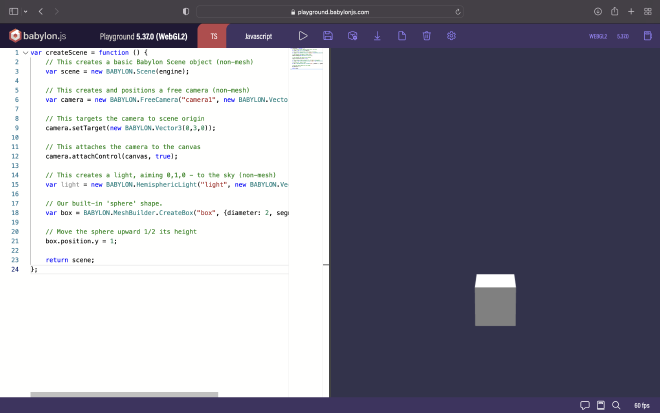
You can run this in your browser through this link: https://playground.babylonjs.com/#DSH9NF
The cube would stay mostly in the same place, moving from side to side. Now that we’ve got this next up is the scrolling environment function.
The scrolling environment #
The scrolling environment is going to be more cubes. First, I’m going to make just one. Make it a different color than the ‘player’, a random color for now.
With Babylon you don’t have an Update() function, you have observables. Those can be either on the scene object or on the created objects themselves. As far as I know there’s no disadvantage to doing it on the object itself, so I’m going to be doing that. First making just one environment cube that scrolls under the player cube.
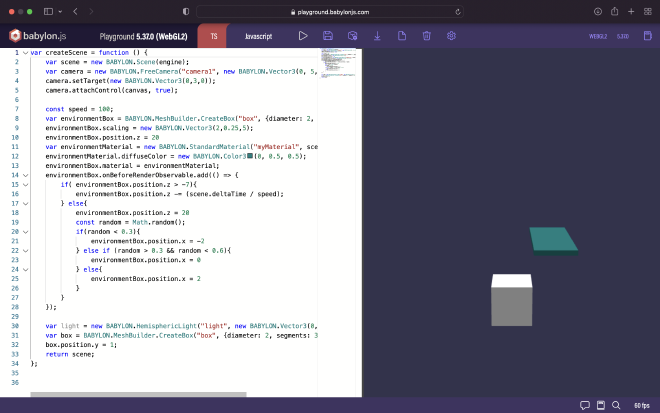
Here’s the playground link for it: https://playground.babylonjs.com/#DSH9NF#1
The next step is to expand on that first scrolling cube and create a bunch of them. This wasn’t as easy as I’d hoped by just putting the code I used for the one in a for loop. I ended up having to use the scene onBeforeRenderObservable and create a separate loop to set them all. When I tried just looping my first implementation the references didn’t get saved and only one of the x cubes would move.
So I created two loops, one to create the environment scrolling boxes, and one to add them to the update loop. I also added some variables outside of these loops so I could control the number of scrolling boxes. Each cube also has a random shade of green to keep it visually interesting.
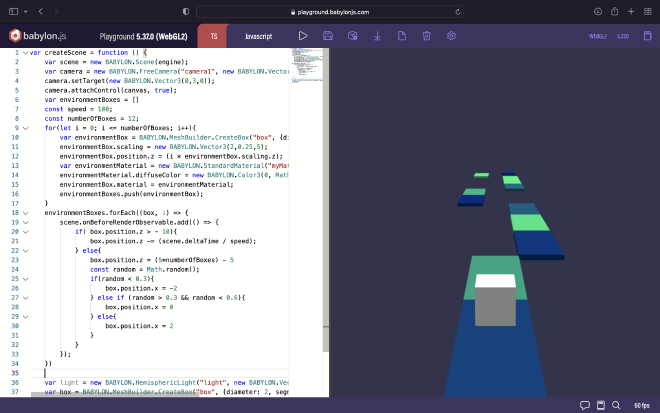
https://playground.babylonjs.com/#DSH9NF#2
Input #
Next is input, I want to experiment with a few things but the basic functionality is to get the cube in one of three positions so it can be on the scrolling cubes. So here I’ve mapped the positions to the 1, 2 and 3 keys.
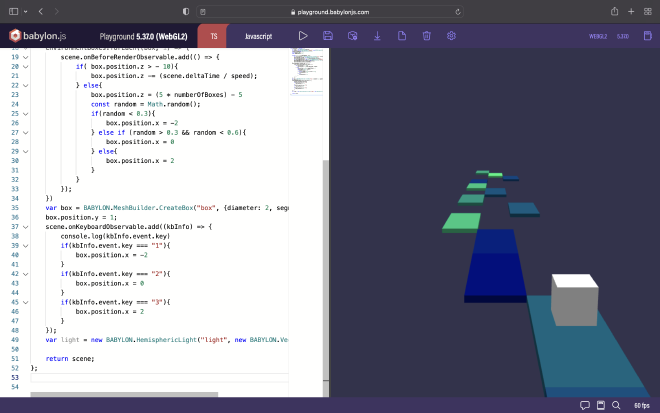
https://playground.babylonjs.com/#DSH9NF#3
And next, smoother movement. Instead of the cube hopping from place to place, we’ll add an animation so it moves there in a few frames. I used a built in function to create a new animation instead of defining key frames myself. This might cause a new animation being made and hanging around every time the user presses a key… But that seems like a perfect problem for future me to solve.
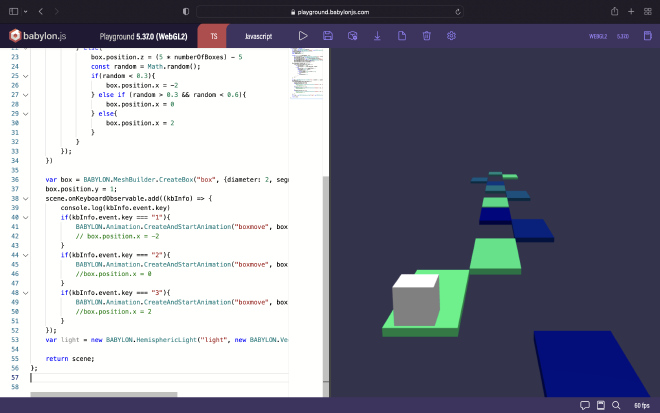
https://playground.babylonjs.com/#DSH9NF#4
I might map these options to the arrow keys in the future, but for now it’s all functional and smooth enough.
Feedback #
Next up, we need to communicate to players when it’s going well. So we should check when the player block is on top of the environment block. Once we can check that we should give feedback based on that information, probably with both some kind of particle system and a score in text. First checking if the cube is above an environment cube, then adding to a score variable when it is, and finally showing that score variable on screen somewhere.
I want to avoid using physics just yet, since they add a lot of bloat to a project. So for now, I’ll use the Babylon ActionManager and see how far I can get. After some experimentation, this is what that looks like:
box.actionManager.registerAction(new BABYLON.ExecuteCodeAction(
  {
    trigger: BABYLON.ActionManager.OnIntersectionEnterTrigger,
    parameter: {mesh: envBox}
  },
  function() {score += 1; console.log(score)})
);
Then using Babylon GUI to get it on screen, I figured top middle was a good place for it since we’re not going to be having a lot of other UI. This score is currently only going up, so we need to figure out how to check if there’s no platform underneath the player. Without collisions this was a bit of a puzzle, but we have both OnIntersectionEnterTrigger and OnIntersectionExitTrigger, so I ended up just adding a counter. It counts up when OnIntersectionEnterTrigger is called and subtracts when OnIntersectionExitTrigger is called. Then, in the onBeforeRenderObservable, I also count how long this has been zero. If it’s been 0 for longer than 30 frames I reset the score to 0.
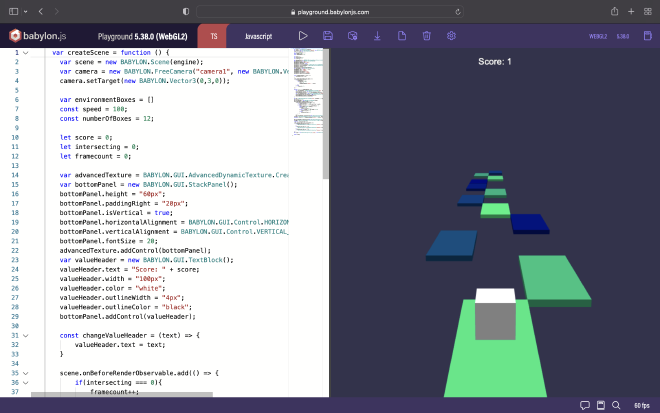
https://playground.babylonjs.com/#DSH9NF#5
Next, just for kicks, we’ll have the cube ’take’ the color of the environment cube it’s just intersected with. So the player cube turns the color of the environment cube, and the environment cube turns white. I found that when I just set the cubes their new colors, it felt off. So I added an animation that changes the color in a few frames.
Raising the stakes #
Next, making the game a little bit harder. I’m going to let the score influence the speed of it. The higher the score, the faster the environment scrolls. I can just add the score to the speed calculation to implement this. I did find that when the score get’s too high, everything moves too fast and breaks :D. While fun, I put an if in the calculation so it can never be more than 75. Lastly, a particle system, why not.
….
Okay, I got lost in particle systems for a few days and in the end it looked terrible. So I’m back now and I need to finish this. I ended up going for something way simpler. I spawn a new cube and fade it out. All of this combined makes for a nice bit of feedback.
Done! #
Time sure flies when you’re working out if the little game you’ve made is actually fun. But this was meant to be a quick project so this is just what it’s going to be.
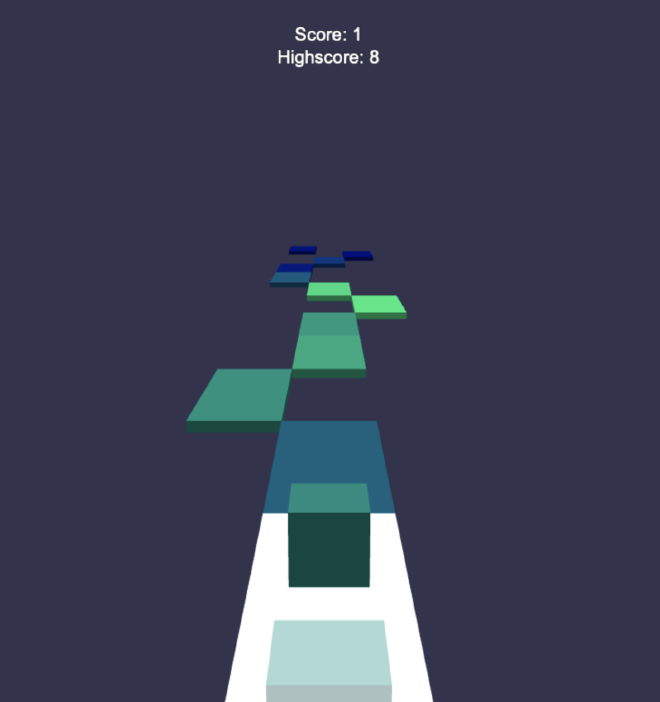
https://playground.babylonjs.com/#DSH9NF#6
Lol, there’s some serious bugs #
Okay, so the plan was to stop it there, but then I played it some more, and a bit longer and I found out that the framerate just slows down after a while. When looking with the debug tools, it was obvious that it was happening immediately when starting the game, even if you didn’t do anything…
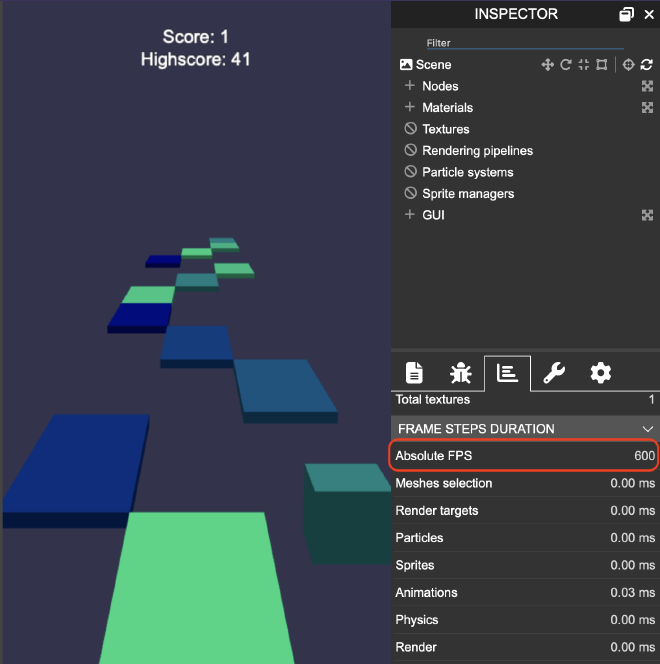
Now, since I wrote and build this almost at the same time, maybe you’ve spotted my big mistake already. It’s between https://playground.babylonjs.com/#DSH9NF#5 and https://playground.babylonjs.com/#DSH9NF#6. I’m not exactly sure how, but I probably misplaced a bracket, so now every frame it was registering a new action for the trigger of the box… What was helpful here was the absolute frame count, since in the regular fps counter at the bottom of the playground would show a clean 60 fps for the first few minutes to only then drop. This is why I continued on without an idea that there was something wrong.
Another thing that I encountered while trying to fix that bug was that I had, for some reason, used var instead of const or let. So for my first fix attempt my coloring animations between the environment cube and the player cube went wrong. It would only take the color of one environment cube, the last one. I kind of expected a problem like this, but not enough to actually change the vars. But it was fixed by changing the var to a let.
In the end, I’m left with a small game that I’m quite content with. Here’s all the code if you want that, or a link to the final™ playground https://playground.babylonjs.com/#DSH9NF#8
var createScene = function () {
    var scene = new BABYLON.Scene(engine);
    var camera = new BABYLON.FreeCamera("camera1", new BABYLON.Vector3(0, 5, -10), scene);
    camera.setTarget(new BABYLON.Vector3(0,3,0));

    var environmentBoxes = []
    const speed = 100;
    const numberOfBoxes = 12;

    let score = 0;
    let highscore = 0;
    let intersecting = 0;
    let framecount = 0;

    var advancedTexture = BABYLON.GUI.AdvancedDynamicTexture.CreateFullscreenUI("UI");
    var bottomPanel = new BABYLON.GUI.StackPanel();
    bottomPanel.height = "80px";
    bottomPanel.paddingRight = "20px";
    bottomPanel.isVertical = true;
    bottomPanel.horizontalAlignment = BABYLON.GUI.Control.HORIZONTAL_ALIGNMENT_STRETCH;
    bottomPanel.verticalAlignment = BABYLON.GUI.Control.VERTICAL_ALIGNMENT_TOP;
    bottomPanel.fontSize = 20;
    advancedTexture.addControl(bottomPanel);
    var scoreText = new BABYLON.GUI.TextBlock();
    scoreText.text = "Score: " + score;
    scoreText.width = "100px";
    scoreText.color = "white";
    scoreText.outlineWidth = "4px";
    scoreText.outlineColor = "black";
    bottomPanel.addControl(scoreText);
    var highScoreText = new BABYLON.GUI.TextBlock();
    highScoreText.paddingTop = 50
    highScoreText.text = "Highscore: " + highscore;
    highScoreText.width = "200px";
    highScoreText.color = "white";
    highScoreText.outlineWidth = "4px";
    highScoreText.outlineColor = "black";
    bottomPanel.addControl(highScoreText);

    var box = BABYLON.MeshBuilder.CreateBox("box", {diameter: 2, segments: 32}, scene);
    box.position.y = 0.6;
    box.actionManager = new BABYLON.ActionManager(scene);
    box.material = new BABYLON.StandardMaterial();
    var ghostBoxMaterial = new BABYLON.StandardMaterial("ghostBoxMaterial", scene);


    const changeValueHeader = (text) => {
        scoreText.text = text;
    }

    scene.onBeforeRenderObservable.add(() => {
        if(intersecting === 0){
            framecount++;
            if(framecount > 20){
                highScoreText.text = "Highscore: " + highscore;
                score = 0;
                changeValueHeader("Score: " + score)
            }
        } else{
            framecount = 0;
        }
        if(score > highscore){
            highscore = score;

        }
    });

    for(let i = 0; i <= numberOfBoxes; i++){
        let environmentBox = BABYLON.MeshBuilder.CreateBox("box", {diameter: 2, segments: 32}, scene);
        environmentBox.scaling = new BABYLON.Vector3(2,0.25,5);
        environmentBox.position.z = (i * environmentBox.scaling.z);
        let environmentMaterial = new BABYLON.StandardMaterial("myMaterial", scene);
        environmentMaterial.diffuseColor = new BABYLON.Color3(0, Math.random(), 0.5);
        environmentBox.material = environmentMaterial;
        environmentBoxes.push(environmentBox);
        box.actionManager.registerAction(
            new BABYLON.ExecuteCodeAction({
                trigger: BABYLON.ActionManager.OnIntersectionEnterTrigger,
                parameter: {mesh: environmentBox}},
                function() {
                    score += 1;
                    changeValueHeader("Score: " + score);
                    BABYLON.Animation.CreateAndStartAnimation("changeColor", box, "material.diffuseColor", 60, 5, box.material.diffuseColor , environmentBox.material.diffuseColor, 0);
                    BABYLON.Animation.CreateAndStartAnimation("changeColor", environmentBox, "material.diffuseColor", 60, 5,  environmentBox.material.diffuseColor, BABYLON.Color3.White, 0);

                    const ghostBox = BABYLON.MeshBuilder.CreateBox("ghostBox", {diameter: 2, segments: 32}, scene);
                    ghostBox.position = box.position.clone();

                    ghostBoxMaterial.diffuseColor = environmentBox.material.diffuseColor;
                    ghostBox.material = ghostBoxMaterial;
                    const visibility = BABYLON.Animation.CreateAndStartAnimation("changeVisibility", ghostBox, "visibility", 60, 30, 1, 0, 0, null, () => {ghostBox.dispose()});
                    scene.onBeforeRenderObservable.add(() => {
                        if( ghostBox.position.z > - 10){
                            ghostBox.position.z -= (scene.deltaTime / (speed - (score < 75 ? score : 75)));
                        }
                    });
                    visibility.disposeOnEnd = true;
                    environmentBox.material.diffuseColor = BABYLON.Color3.White();
                    intersecting++;
                }
            )
        );

        box.actionManager.registerAction(
            new BABYLON.ExecuteCodeAction({
                trigger: BABYLON.ActionManager.OnIntersectionExitTrigger,
                parameter: {mesh: environmentBox}},
                function() {
                    intersecting--;
                }
            )
        );
    }


    scene.onBeforeRenderObservable.add(() => {
        for(let i = 0; i <= numberOfBoxes; i++){
            const currentBox = environmentBoxes[i];
            const previousBox = environmentBoxes[i > 0 ? i - 1 : numberOfBoxes]
            if( currentBox.position.z > -10){
                currentBox.position.z -= (scene.deltaTime / (speed - (score < 75 ? score : 75)));

            } else {
                currentBox.position.z = previousBox.position.z + 5
                const random = Math.random();
                currentBox.material.diffuseColor = new BABYLON.Color3(0, Math.random(), 0.5);

                if(random < 0.3){
                    currentBox.position.x = -2
                } else if (random > 0.3 && random < 0.6){
                    currentBox.position.x = 0
                } else{
                    currentBox.position.x = 2

                }
            }
            }
        }
    );

    scene.onKeyboardObservable.add((kbInfo) => {
        if(kbInfo.event.key === "1"){
            if(score < 50){
              BABYLON.Animation.CreateAndStartAnimation("boxmove", box, "position.x", 60, 5, box.position.x, -2, 0);
            } else{
                box.position.x = -2
            }
        }
        if(kbInfo.event.key === "2"){
            if(score < 50){
                BABYLON.Animation.CreateAndStartAnimation("boxmove", box, "position.x", 60, 5, box.position.x, 0, 0);
              } else{
                box.position.x = 0
            }
        }
        if(kbInfo.event.key === "3"){
            if(score < 50){
                BABYLON.Animation.CreateAndStartAnimation("boxmove", box, "position.x", 60, 5, box.position.x, 2, 0);
              } else{
                box.position.x = 2
            }
        }
    });
    var light = new BABYLON.HemisphericLight("light", new BABYLON.Vector3(0, 1, 0), scene);

    return scene;
};
And here’s my highscore :D

Conclusion #
To conclude I’m happy with what I’ve made, it’s not far off from my original goal except that it’s still all in the Playground. I did let myself get carried away with the particle system investigation, but I guess that’s inevitable. The next step is to move this to a local project, which I can then upload to itch.io and get some statistics, see if people would be able to find and play this game.